
Monitor Light Bars: The Complete & Best Guide to Better Desk Lighting Upgrade for Work, Study & Gaming

description: Discover what monitor light bars are, how they work, their benefits and limitations, and how to choose the best one for your monitor, workspace, and budget.

A monitor light bar is one of the simplest ways to improve a computer desk setup. It attaches to the top of your monitor and shines light downward onto your keyboard, documents, and desktop without taking up the space required by a traditional desk lamp.
For people who work, study, design, code, or play games for long periods, a monitor light bar can make the workspace feel more comfortable and organized. However, not every model performs equally well. Beam angle, brightness, color temperature, mounting design, monitor compatibility, and glare control all affect the experience.
This guide explains everything you need to know before buying and using a monitor light bar.
What Is a Monitor Light Bar?
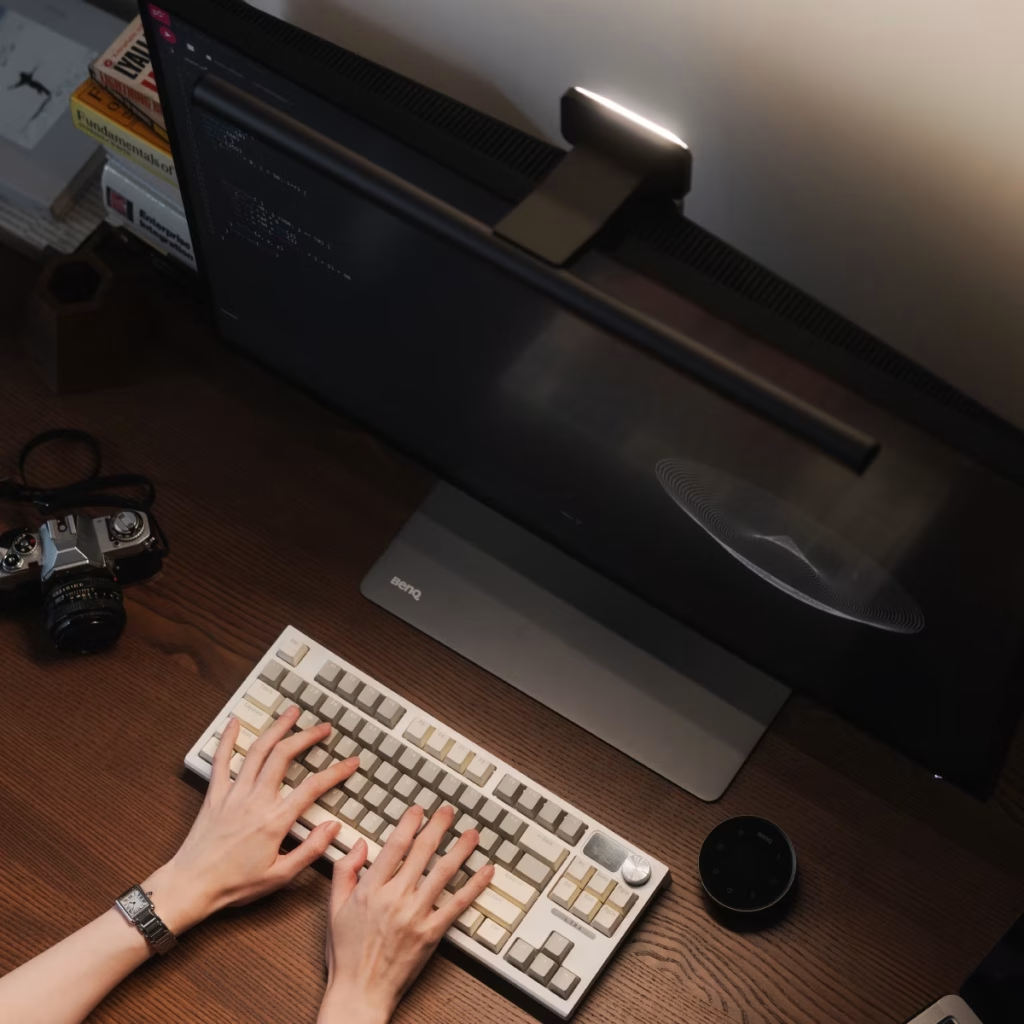
A monitor light bar is a slim LED lamp designed to sit on top of a computer monitor. Most models use a counterweighted clip, adjustable bracket, or magnetic mounting system to remain balanced without drilling holes or attaching hardware to the desk.
Unlike a conventional desk lamp, a monitor light bar is designed to direct light toward the work surface. The best models use directional or asymmetric optics to illuminate the desk while limiting light reflected from the display.
Many monitor light bars include:
- Adjustable brightness.
- Warm, neutral, and cool color temperatures.
- Touch controls or a wireless control dial.
- Automatic brightness adjustment.
- USB power.
- Memory settings.
- Rear-facing ambient or bias lighting.
- RGB lighting for gaming setups.
The main purpose is not to make the monitor brighter. It is to create more balanced lighting around the screen.
How Monitor Light Bars Work
A monitor light bar typically contains a row of LEDs placed inside a narrow housing. The housing directs the LEDs downward and forward, allowing the bar to illuminate the area below the monitor.
This design differs from a basic LED strip or a normal desk lamp. A desk lamp may shine light across the screen, creating reflections. A poorly designed light bar can cause the same problem. A well-designed model controls the direction and spread of light so that it reaches the desk without shining directly into your eyes.
Some premium models use asymmetric optical designs specifically intended to reduce screen reflections and direct glare. BenQ describes its ScreenBar design as using a reflective panel and controlled beam pattern to illuminate the desk while avoiding reflective glare on the display.benq
The result is a lighting setup that can make your keyboard, notebook, and other desktop objects easier to see without adding another large object to your desk.
Why Use a Monitor Light Bar?
1. It saves desk space
A traditional desk lamp may occupy a considerable part of your workspace. This can be inconvenient if you have a small desk, a large keyboard, speakers, notebooks, or multiple monitors.
A monitor light bar uses vertical space instead. Because it rests on the monitor, your desk surface remains available for other equipment.
2. It reduces harsh contrast
Working in a completely dark room with a bright monitor can feel uncomfortable. Your eyes constantly adjust between the luminous display and the darker surrounding area.
A light bar does not eliminate this contrast by itself, but it can brighten the desk and nearby workspace. Some models also project light behind the monitor, helping create a more balanced environment.
The American Optometric Association recommends adjusting room lighting so it is not significantly brighter or darker than the screen and recommends positioning the display to reduce glare.aoa
3. It can reduce reflections
Reflections from overhead lights, windows, or desk lamps can make text difficult to read. They can also reduce perceived contrast and force you to adjust the monitor or your seating position.
A monitor light bar with directional optics can illuminate the desk without sending as much light directly toward the screen. However, correct placement is still important. Even a high-quality model may create glare if it is pointed at the display.
4. It improves visibility at the desk
A light bar is useful for more than viewing the monitor. It can illuminate:
- Keyboard keys.
- Notebooks.
- Printed documents.
- Drawing tablets.
- Desk controls.
- Small objects and electronics.
- Craft or repair work near the monitor.
This makes it especially useful for students, writers, programmers, office workers, photographers, designers, and people who regularly work at night.
5. It creates a cleaner setup
Monitor light bars have a minimal appearance. They can help create a tidy desk without the cable clutter or visual bulk associated with a large lamp.
For gaming setups, RGB models can also add color around the display. For professional workspaces, a simple black or silver bar can blend into the monitor and remain visually unobtrusive.
Can a Monitor Light Bar Prevent Eye Strain?
A monitor light bar should not be advertised as a cure for eye strain. Digital eye strain can result from prolonged screen use, dry eyes, uncorrected vision problems, glare, poor viewing distance, and inadequate breaks.
However, better lighting may improve comfort by reducing glare and making the surrounding workspace less harsh. The American Optometric Association identifies digital eye strain as a group of eye and vision-related problems associated with prolonged digital-device use. It recommends controlling glare, adjusting lighting, maintaining a comfortable viewing distance, and taking regular breaks.aoa
A monitor light bar is therefore best understood as one part of a comfortable workstation—not a medical treatment.
For additional comfort:
- Keep the screen roughly 20–28 inches from your eyes when practical.
- Position the monitor slightly below eye level.
- Adjust screen brightness to match the room.
- Avoid placing the display directly in front of a bright window.
- Follow the 20-20-20 rule: every 20 minutes, look at something about 20 feet away for 20 seconds.
- Blink regularly and take longer breaks during extended sessions.
If eye discomfort continues or affects your vision, consult an eye-care professional.
Important Features to Consider
Brightness adjustment
A good monitor light bar should offer several brightness levels rather than only an on/off switch.
Low brightness is useful in a dark room or during evening use. Higher brightness can help during daytime work or when reading printed documents.
Do not assume that the highest brightness is the best setting. Excessively bright light can be distracting and may create reflections.
Adjustable color temperature
Color temperature is measured in Kelvin, or K. Lower values appear warmer and more yellow, while higher values appear cooler and more bluish.
| Color temperature | Appearance | Useful for |
|---|---|---|
| 2700–3500K | Warm and yellow | Evening use and relaxing environments |
| 4000–5000K | Neutral white | General office work and reading |
| 5500–6500K | Cool daylight | Daytime work and focused tasks |
A wide range, such as approximately 2700K to 6500K, gives you flexibility throughout the day. Several current monitor light bar models offer this type of adjustable range.standdesklab
Warm light may feel more comfortable at night, while neutral or cooler light may suit daytime work. Color temperature is largely a preference, so experiment instead of relying on a single “perfect” setting.
Glare control and optical design
This is one of the most important features.
Look for terms such as:
- Asymmetric optical design.
- Directional lighting.
- Anti-glare illumination.
- Screen-reflection reduction.
- Downward-facing beam.
- Adjustable light angle.
The light should illuminate the desk rather than shine directly into your eyes or reflect from the display. A model with simple exposed LEDs may be cheaper, but it can produce uneven or uncomfortable light.
Mounting system
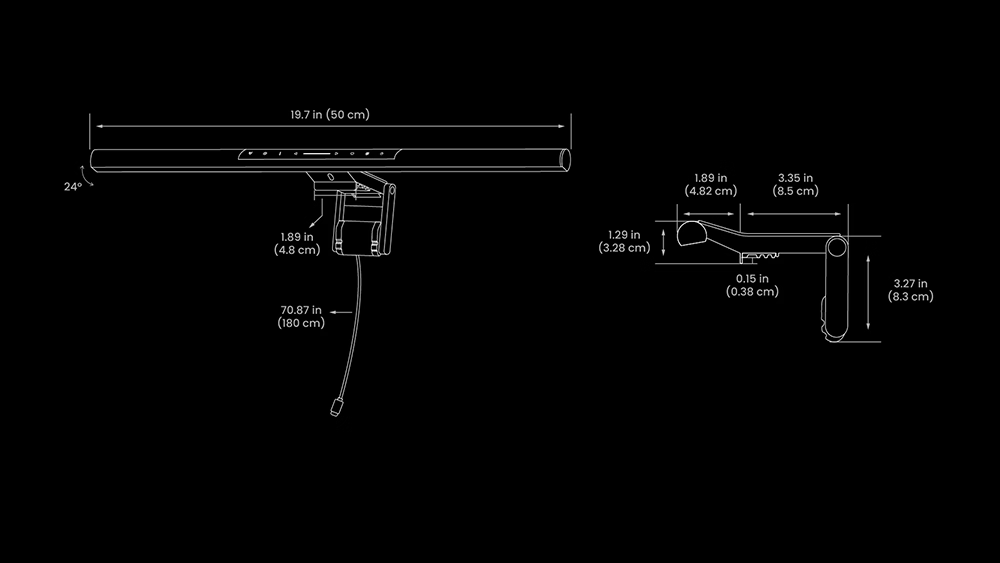
Most light bars use a counterweight that rests behind the monitor. The mounting system should hold the bar securely without placing excessive pressure on the panel.
Before buying, check:
- The thickness of your monitor.
- The size of the top bezel.
- Whether the clip fits frameless displays.
- Whether the rear of the monitor is flat or curved.
- Whether the bar blocks a webcam.
- Whether the mount interferes with a monitor arm.
Very thin monitors may require a lighter or more carefully designed mounting system. If your display has a narrow bezel, choose a bar designed for slim monitors.
Curved-monitor compatibility
A standard straight bar may work on some curved displays, but it may not sit evenly or distribute light properly across the screen and desk.
If you use an ultrawide or strongly curved monitor, look for:
- A curved light bar.
- A pivoting mount.
- An adjustable counterweight.
- A bar specifically rated for curved displays.
- Sufficient length to cover the usable desk area.
Some current products are marketed specifically for curved and ultrawide monitors, while others are intended mainly for flat screens.benq
Power connection
Most monitor light bars receive power through USB. They can often connect to:
- A monitor USB port.
- A desktop computer.
- A laptop dock.
- A USB wall adapter.
- A powered USB hub.
Check whether the product uses USB-A, USB-C, or a proprietary connector. Also confirm that your monitor’s USB port supplies enough power. If the light flickers or fails to reach full brightness, connect it directly to a suitable power adapter.
Controls
Monitor light bars usually offer one of three control styles:
| Control type | Advantages | Limitations |
|---|---|---|
| Touch controls | Simple and built into the bar | Requires reaching toward the monitor |
| Wireless dial | Easy to adjust from the desk | Adds another device and battery |
| App control | Useful for automation and smart-home setups | Requires software or a wireless connection |
A wireless dial is particularly convenient if you frequently change brightness or color temperature. Touch controls are usually sufficient for a basic workspace.
Rear lighting
Some advanced models include rear-facing light that illuminates the wall behind the monitor. This is often called bias lighting or ambient backlighting.
Rear lighting can:
- Add soft illumination behind the display.
- Reduce the visual difference between the screen and the wall.
- Improve the appearance of a dark-room setup.
- Add RGB effects for gaming.
It is not essential for everyone. If your desk is already in a well-lit room, a front-facing light bar may be enough. If you work in a dark room, rear illumination may be more valuable.
Color rendering
Color rendering describes how naturally a light source reveals colors. It is commonly represented by CRI, or Color Rendering Index.
A higher CRI can be important for:
- Graphic design.
- Photography.
- Video editing.
- Product photography.
- Illustration.
- Art and craft work.
For ordinary typing and browsing, CRI may be less important than glare control and brightness consistency. For color-sensitive work, look for a manufacturer that publishes CRI information rather than relying only on marketing language.
Monitor Light Bar vs. Desk Lamp
Both products can be useful, but they serve different purposes.
| Feature | Monitor light bar | Desk lamp |
|---|---|---|
| Desk space | Uses very little surface space | Requires desk space |
| Lighting direction | Usually aimed downward | Often spreads in several directions |
| Screen glare | Lower when properly designed | More likely if poorly positioned |
| Document lighting | Good for nearby documents | Often better for large documents |
| Portability | Usually stays with the monitor | Easy to move around |
| Appearance | Minimal and modern | Available in many styles |
| Multi-monitor use | May need one or a longer model | Can illuminate a wider area |
Choose a monitor light bar if you want targeted lighting and a clean setup. Choose a desk lamp if you need to illuminate a broad workspace, move the light frequently, or work with large paper documents.
In some workspaces, using both is ideal: a monitor light bar for the keyboard and desk, plus soft room lighting for the surrounding environment.
Monitor Light Bar vs. Bias Lighting
These two products are often confused.
A monitor light bar sits above the display and lights the area in front of or below the monitor. Bias lighting is placed behind the monitor and shines toward the wall.
Front lighting is useful for:
- Keyboards.
- Paperwork.
- Desk tasks.
- Reading physical objects.
Rear bias lighting is useful for:
- Softening a dark wall behind the display.
- Creating a more balanced viewing environment.
- Adding ambient color.
- Improving the appearance of a gaming or media setup.
Some premium monitor light bars combine both functions, but a basic light bar usually provides front-facing illumination only.
How to Install a Monitor Light Bar
Installation is usually simple and does not require tools.
- Clean the top of the monitor so dust does not affect the mount.
- Place the counterweight or clip over the upper edge.
- Center the bar horizontally.
- Connect the USB power cable.
- Turn the light on at a low brightness.
- Angle the light toward the desk.
- Check the screen from your normal sitting position.
- Adjust the angle until the keyboard and work area are visible without reflections.
Do not position the light so that the LED strip is directly visible from your seated position. If the LEDs appear harsh, lower the brightness, tilt the bar downward, or choose a model with better diffusion.
Best Positioning Practices
Correct positioning is just as important as product quality.
Aim the light at the desk
The beam should fall on your keyboard and work surface. It should not shine directly into your eyes.
Avoid screen reflections
Turn off the monitor temporarily and inspect the dark screen. If you can see a bright reflection from the light bar, adjust its angle or brightness.
Workplace ergonomics guidance commonly recommends positioning screens away from direct glare and using task lighting that illuminates documents rather than the monitor.ehs.oregonstate
Match the surrounding light
A very bright light bar in an otherwise dark room may not be comfortable. Use soft room lighting or rear bias lighting when necessary.
Keep the monitor at a comfortable height
Lighting cannot compensate for poor monitor ergonomics. The top of the display should generally be near or slightly below eye level, and the screen should be positioned at a comfortable viewing distance.
Consider your webcam
Some light bars may block a webcam mounted on the monitor. If you attend video meetings, choose a model with a camera-friendly design or mount the webcam above the light bar.
Monitor Light Bars for Different Users
For office workers
Prioritize:
- Even white light.
- Easy brightness adjustment.
- Neutral color temperature.
- Quiet, reliable operation.
- A secure mount.
You probably do not need RGB or app integration.
For students
Look for:
- Affordable pricing.
- USB power.
- Warm and cool settings.
- Good lighting for notebooks and textbooks.
- Simple controls.
A light bar can be particularly useful in a small bedroom or dorm room where a full desk lamp takes up too much space.
For programmers and writers
Prioritize:
- Low glare.
- Adjustable brightness.
- Comfortable evening color temperature.
- A wireless control dial or accessible touch control.
- Flicker-free performance, if specified by the manufacturer.
For gamers
Consider:
- Rear ambient lighting.
- RGB effects.
- Game or smart-home integration.
- Compatibility with a curved or ultrawide display.
- A design that does not obstruct the webcam or monitor top edge.
Avoid choosing RGB effects over basic lighting quality. Colorful lighting may look attractive, but glare control remains more important.
For designers and photographers
Focus on:
- High color-rendering performance.
- Consistent illumination.
- Adjustable color temperature.
- Low glare.
- Reliable brightness control.
For professional color-critical work, a monitor light bar should complement—not replace—properly calibrated studio or room lighting.
Common Problems and Solutions
The light reflects on the screen
Lower the brightness and tilt the bar farther downward. You can also move the monitor slightly or change the bar’s horizontal position.
The light shines in your eyes
The bar may be too far forward, too bright, or angled incorrectly. Rotate it toward the desktop and ensure the LED source is not visible from your normal seating position.
The monitor shakes
The mount may be too heavy for the display or not properly balanced. Check the clip position and manufacturer’s monitor compatibility recommendations.
The light does not cover the entire desk
A short bar may not be suitable for a large ultrawide monitor. Choose a longer model or supplement it with a desk lamp.
The light flickers
Try another USB port or a wall adapter. If the problem continues, the unit may have a power or quality issue. Flicker can be distracting even when it is not immediately obvious.
The bar blocks the webcam
Raise the webcam, mount it separately, or select a light bar with a webcam-friendly shape.
The colors look strange
If the light is being used for visual work, select a neutral color temperature and verify the product’s color-rendering specifications. RGB modes are generally intended for atmosphere rather than accurate color evaluation.
Are Cheap Monitor Light Bars Worth It?
Budget models can be worthwhile when your needs are basic. An inexpensive light bar may provide useful desk illumination if it offers stable brightness, a secure mount, and acceptable glare control.
However, cheaper products may have:
- Uneven light distribution.
- Limited color-temperature settings.
- Weak mounting clips.
- Visible LED hotspots.
- Short cables.
- No automatic brightness adjustment.
- Poor compatibility with curved monitors.
Premium models often justify their higher price through better optics, stronger construction, wireless controls, auto-dimming, and rear lighting. Current buying guides commonly place models from Quntis, Xiaomi, Yeelight, and BenQ across budget, mid-range, smart, and premium categories.austingallery
The best choice depends on your priorities. Someone who only wants basic keyboard lighting may not benefit from an expensive flagship model, while a person working every evening in a dark room may appreciate better optics and rear illumination.
What to Look for ?
When shopping for a monitor light bar, consider these features in order of importance:
- Proper glare control.
- A stable mount compatible with your monitor.
- Adjustable brightness.
- Adjustable color temperature.
- Even light distribution.
- USB power compatibility.
- A control method you will actually use.
- Rear lighting, if you work in a dark room.
- Smart features or RGB effects.
- Color-rendering performance for creative work.
Do not choose a light bar solely because it has the highest brightness, the most RGB effects, or the longest feature list. A comfortable beam pattern and reliable mount matter more in daily use.
Frequently Asked Questions
Do monitor light bars work with laptops?
Some can, but compatibility varies. A laptop display may be too thin or flexible for a counterweighted light bar. A small USB desk lamp may be safer for many laptops unless the product specifically supports laptop screens.
Can I use a monitor light bar on a curved monitor?
Yes, but check the product specifications first. Strongly curved or ultrawide displays may require a curved bar or adjustable mount.
Does a monitor light bar use much electricity?
Most USB-powered LED bars use relatively little power compared with larger lamps. Actual consumption varies by model and brightness level.
Should I use a light bar in a dark room?
You can, but a front-facing light bar alone may not provide enough ambient illumination. Consider adding soft room lighting or rear bias lighting to avoid an overly bright screen surrounded by darkness.
Is a monitor light bar better than an RGB strip?
They are designed for different purposes. A monitor light bar provides task lighting in front of the display, while an RGB strip mainly creates decorative or ambient lighting behind it.
Can a monitor light bar damage my monitor?
A properly designed, correctly installed model should not damage a compatible monitor. Avoid products that place excessive pressure on the panel, block ventilation, or use unstable clips.
Do monitor light bars reduce blue light?
Some models allow you to select a warmer color temperature, which reduces the blue appearance of the light. This does not mean the product eliminates all blue light or prevents eye problems.
Final Verdict
Monitor light bars are a practical upgrade for many computer workspaces. They use little desk space, improve visibility around the keyboard, offer flexible brightness and color settings, and can reduce distracting reflections when properly designed and positioned.
The most important buying priorities are glare control, monitor compatibility, stable mounting, adjustable brightness, and comfortable color temperature. Extra features such as wireless controls, automatic dimming, RGB effects, and rear lighting are useful—but they should come after the fundamentals.
If your desk feels too dark, your desk lamp creates reflections, or you want a cleaner workspace, a monitor light bar may be a worthwhile addition. Used alongside sensible screen positioning, balanced room lighting, and regular breaks, it can make long hours at your computer more comfortable and productive.