
Device & Laptop Portable Stands: A Brief but Complete Guide

A portable laptop or device stand is a compact, foldable riser that lifts your screen to a healthier height so you can work comfortably from anywhere. Instead of hunching over a flat laptop on a café table, hotel desk, or couch, you create a mini ergonomic workstation in under two minutes—then fold it back into your bag when you’re done.
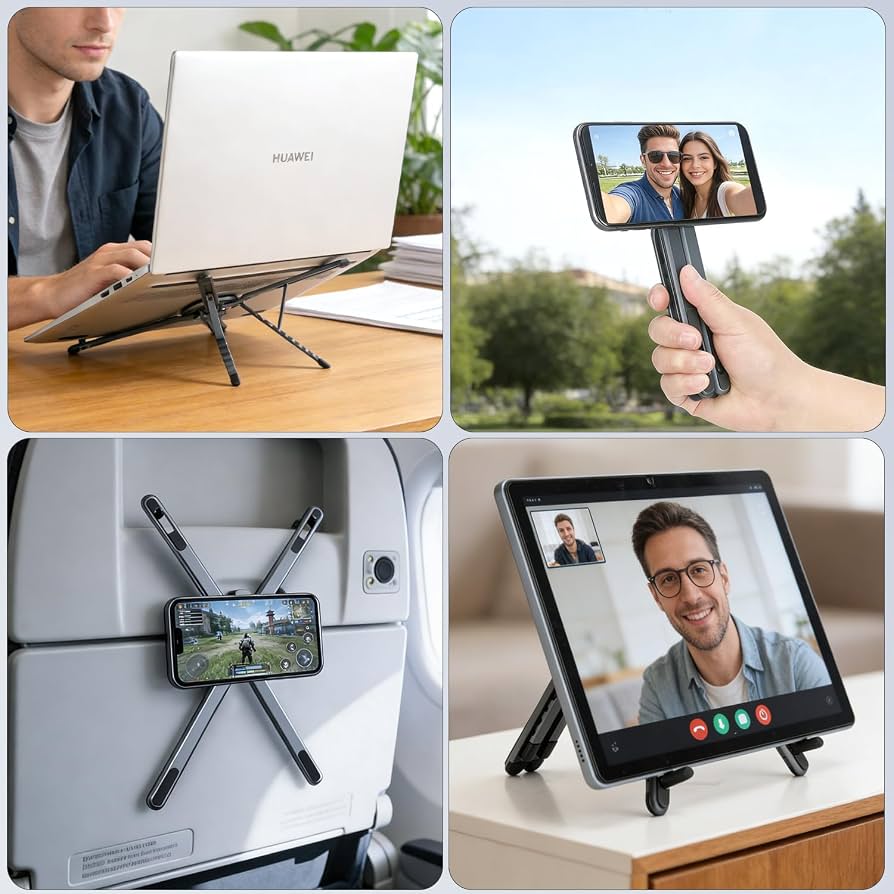
Why Portable Stands Matter (Beyond “Looking Pro”)
Most people underestimate how much time they spend looking down at a laptop. When your screen sits at desk level, your neck often bends forward by 30–60 degrees, which loads your spine and strains muscles in your neck, shoulders, and upper back. Over hours and days, that posture contributes to pain, fatigue, and even longer-term musculoskeletal issues.
A good portable stand directly addresses this by:
- Raising the screen toward eye level, so your neck stays closer to neutral instead of constantly flexed forward.
- Reducing neck and shoulder strain, with research showing up to ~23 degrees less neck flexion when using a stand plus an external keyboard versus a flat laptop.
- Improving airflow and cooling, because elevating the laptop opens space underneath for better heat dissipation.
- Making any surface usable, from tiny café tables to wobbly hotel desks, by giving you a stable, repeatable setup you can trust.
For remote workers, students, and digital nomads, that’s not just comfort—it’s health infrastructure you can carry in a backpack.
How Portable Laptop Stands Improve Ergonomics
Ergonomics is about fitting your tools to your body, not forcing your body to fit your tools. With a laptop alone, the screen and keyboard are locked together at a bad height for both viewing and typing. A portable stand breaks that link.
The basic ergonomic idea
- Screen height: Ideally, your eyes should be around the top third of the screen, which usually means lifting the laptop 6–12 inches off the desk.
- Viewing angle: A slight backward tilt of about 15–20 degrees reduces glare and keeps your neck in a neutral position.
- Keyboard and mouse: Experts recommend keeping your forearms near a 90-degree angle, with wrists straight and shoulders relaxed—something that’s hard to do if you’re typing directly on a raised laptop.
That’s why the “gold standard” portable setup is:
Laptop on stand (screen at eye level) + external keyboard + external mouse.
This lets you position the screen for your eyes and the keyboard for your arms independently, which is far more comfortable for long sessions.
Key Features to Look For
Not all portable stands are created equal. When choosing one, focus on these factors:
- Weight and packed size: For travel, aim for stands under ~2 lbs that fold flat and fit easily into a laptop sleeve or backpack.
- Height range and adjustability: Multiple height positions (e.g., 6–12+ inches) and angle options let you fine-tune ergonomics for different desks and your own body.
- Stability and load capacity: The stand should hold your specific laptop (including larger 15–17″ models) without wobbling when you type.
- Material and build: Aluminum and steel offer durability and a premium feel; well-designed plastic can be lighter and cheaper but must still feel solid.
- Ventilation: Open, vented designs improve airflow under the laptop, helping to prevent overheating during long workloads.
- Device compatibility: Check supported laptop sizes and whether the stand also works with tablets or phones if you need that flexibility.
- Extras: Anti-slip pads, cable management, and included carrying cases make daily use smoother and protect your gear.
Common Types of Portable Laptop & Device Stands
Different designs suit different workflows and travel styles.

1. Foldable aluminum risers
These are the classic “scissor” or hinge-style stands that fold flat into a slim bar.
- Best for: Most travelers and remote workers who want a balance of portability, stability, and adjustability.
- Pros: Lightweight, sturdy, multiple height options, good ventilation.
- Cons: Slightly bulkier than ultra-thin adhesive options, but still very packable.
2. Ultra-thin adhesive or sleeve stands
Very low-profile options that stick to the bottom of your laptop or double as a protective sleeve with a built-in kickstand.
- Best for: Minimalists who travel extremely light and mainly need a small lift and tilt.
- Pros: Almost no added bulk; always “with” your laptop.
- Cons: Limited height; less ideal for full ergonomic setups, more of a posture aid than a full riser.
3. Multi-angle adjustable platforms
Stands with several preset angles or continuous adjustment, often with ventilation holes and a wide base.
- Best for: People who share workspaces or want very fine control over height and tilt.
- Pros: Highly adjustable, stable, good for both laptops and tablets.
- Cons: Can be a bit heavier and less “ultra-compact” than minimalist designs.
4. Lap desks with integrated stands
Larger surfaces you can use on your lap, bed, or couch, sometimes with built-in device holders and mouse areas.
- Best for: Working from sofas, beds, or spaces without proper desks.
- Pros: Creates a stable surface on soft or uneven spots; often includes wrist rests and storage.
- Cons: Less portable than tiny foldable stands; better for home or RV/van life than daily carry.
5. Vertical laptop stands (for desk organization)
These hold your laptop upright when it’s closed, often used with an external monitor.
- Best for: Saving desk space in a semi-permanent setup, not so much for travel ergonomics.
- Pros: Frees up desk space; keeps laptop tidy and accessible.
- Cons: Not designed to support typing; mainly a storage/organization tool.
Who Benefits Most from a Portable Stand?
Portable stands aren’t only for “tech people.” They help anyone who spends significant time on a laptop in non-ideal environments.
- Remote workers and hybrid employees: Turn any desk into an ergonomic station without carrying a monitor.
- Digital nomads and frequent travelers: Protect your neck and back while working from cafés, airports, and hotel rooms.
- Students: Improve posture in libraries, dorms, and shared study spaces with small desks.
- Content creators and developers: Support long coding, editing, or design sessions with better screen height and cooling.
- Professionals on client sites: Quickly set up a professional, comfortable workspace in meeting rooms or co-working spaces.
If you work on a laptop more than a few hours a day, a stand is closer to “essential health gear” than “nice-to-have accessory.”
How to Set Up a Portable Stand for Maximum Benefit
A good stand only helps if you use it correctly. Here’s a simple, repeatable routine:
- Place the stand on a stable surface. Avoid very wobbly tables; if needed, use a small mat or book to level things out.
- Set the height so your eyes are near the top third of the screen. Adjust until your neck feels neutral, not bent forward or tilted up.
- Tilt the screen slightly back (around 15–20 degrees). This reduces glare and keeps your gaze comfortable.
- Connect an external keyboard and mouse if possible. Position them so your elbows are close to your sides and your forearms are near 90 degrees.
- Check for wobble and adjust. Type a bit, move your hands, and make sure the stand feels secure before diving into deep work.
- Tidy cables. Use built-in channels or simple clips so your setup stays clean and easy to pack away.
With practice, this whole process takes under two minutes and becomes automatic.
Common Mistakes to Avoid
Even with a stand, some habits can undermine the benefits:
- Using the stand but still looking down. If you set the stand low “to save space,” you lose most of the ergonomic advantage. Aim for real eye-level height.
- Typing directly on a highly raised laptop. This can strain your wrists and shoulders. If you raise the screen a lot, pair it with an external keyboard and mouse.
- Ignoring stability. A cheap, wobbly stand can be worse than no stand at all. Prioritize models that feel solid with your specific laptop.
- Overloading the stand. Respect the weight and size limits; don’t use a tiny phone stand for a 17-inch gaming laptop.
Final Thoughts
Portable laptop and device stands are one of the highest-impact, lowest-cost upgrades you can make to a mobile or hybrid work lifestyle. They transform any surface into a posture-friendly workstation, reduce neck and back strain, improve cooling, and make long work sessions far more sustainable.
If you spend meaningful time on a laptop—whether you’re traveling, studying, or working remotely—a quality portable stand isn’t a luxury. It’s a small piece of equipment that pays for itself in comfort, productivity, and long-term physical health.A portable laptop or device stand is a compact, foldable riser that lifts your screen to a healthier height so you can work comfortably from anywhere. Instead of hunching over a flat laptop on a café table, hotel desk, or couch, you create a mini ergonomic workstation in under two minutes—then fold it back into your bag when you’re done.
Why Portable Stands Matter (Beyond “Looking Pro”)
Most people underestimate how much time they spend looking down at a laptop. When your screen sits at desk level, your neck often bends forward by 30–60 degrees, which loads your spine and strains muscles in your neck, shoulders, and upper back. Over hours and days, that posture contributes to pain, fatigue, and even longer-term musculoskeletal issues.
A good portable stand directly addresses this by:
- Raising the screen toward eye level, so your neck stays closer to neutral instead of constantly flexed forward.
- Reducing neck and shoulder strain, with research showing up to ~23 degrees less neck flexion when using a stand plus an external keyboard versus a flat laptop.
- Improving airflow and cooling, because elevating the laptop opens space underneath for better heat dissipation.
- Making any surface usable, from tiny café tables to wobbly hotel desks, by giving you a stable, repeatable setup you can trust.
For remote workers, students, and digital nomads, that’s not just comfort—it’s health infrastructure you can carry in a backpack.
How Portable Laptop Stands Improve Ergonomics
Ergonomics is about fitting your tools to your body, not forcing your body to fit your tools. With a laptop alone, the screen and keyboard are locked together at a bad height for both viewing and typing. A portable stand breaks that link.
The basic ergonomic idea
- Screen height: Ideally, your eyes should be around the top third of the screen, which usually means lifting the laptop 6–12 inches off the desk.
- Viewing angle: A slight backward tilt of about 15–20 degrees reduces glare and keeps your neck in a neutral position.
- Keyboard and mouse: Experts recommend keeping your forearms near a 90-degree angle, with wrists straight and shoulders relaxed—something that’s hard to do if you’re typing directly on a raised laptop.
That’s why the “gold standard” portable setup is:
Laptop on stand (screen at eye level) + external keyboard + external mouse.
This lets you position the screen for your eyes and the keyboard for your arms independently, which is far more comfortable for long sessions.
Key Features to Look For
Not all portable stands are created equal. When choosing one, focus on these factors:
- Weight and packed size: For travel, aim for stands under ~2 lbs that fold flat and fit easily into a laptop sleeve or backpack.
- Height range and adjustability: Multiple height positions (e.g., 6–12+ inches) and angle options let you fine-tune ergonomics for different desks and your own body.
- Stability and load capacity: The stand should hold your specific laptop (including larger 15–17″ models) without wobbling when you type.
- Material and build: Aluminum and steel offer durability and a premium feel; well-designed plastic can be lighter and cheaper but must still feel solid.
- Ventilation: Open, vented designs improve airflow under the laptop, helping to prevent overheating during long workloads.
- Device compatibility: Check supported laptop sizes and whether the stand also works with tablets or phones if you need that flexibility.
- Extras: Anti-slip pads, cable management, and included carrying cases make daily use smoother and protect your gear.
Common Types of Portable Laptop & Device Stands
Different designs suit different workflows and travel styles.
1. Foldable aluminum risers
These are the classic “scissor” or hinge-style stands that fold flat into a slim bar.
- Best for: Most travelers and remote workers who want a balance of portability, stability, and adjustability.
- Pros: Lightweight, sturdy, multiple height options, good ventilation.
- Cons: Slightly bulkier than ultra-thin adhesive options, but still very packable.
2. Ultra-thin adhesive or sleeve stands
Very low-profile options that stick to the bottom of your laptop or double as a protective sleeve with a built-in kickstand.
- Best for: Minimalists who travel extremely light and mainly need a small lift and tilt.
- Pros: Almost no added bulk; always “with” your laptop.
- Cons: Limited height; less ideal for full ergonomic setups, more of a posture aid than a full riser.
3. Multi-angle adjustable platforms
Stands with several preset angles or continuous adjustment, often with ventilation holes and a wide base.
- Best for: People who share workspaces or want very fine control over height and tilt.
- Pros: Highly adjustable, stable, good for both laptops and tablets.
- Cons: Can be a bit heavier and less “ultra-compact” than minimalist designs.
4. Lap desks with integrated stands
Larger surfaces you can use on your lap, bed, or couch, sometimes with built-in device holders and mouse areas.
- Best for: Working from sofas, beds, or spaces without proper desks.
- Pros: Creates a stable surface on soft or uneven spots; often includes wrist rests and storage.
- Cons: Less portable than tiny foldable stands; better for home or RV/van life than daily carry.
5. Vertical laptop stands (for desk organization)
These hold your laptop upright when it’s closed, often used with an external monitor.
- Best for: Saving desk space in a semi-permanent setup, not so much for travel ergonomics.
- Pros: Frees up desk space; keeps laptop tidy and accessible.
- Cons: Not designed to support typing; mainly a storage/organization tool.
Who Benefits Most from a Portable Stand?
Portable stands aren’t only for “tech people.” They help anyone who spends significant time on a laptop in non-ideal environments.
- Remote workers and hybrid employees: Turn any desk into an ergonomic station without carrying a monitor.
- Digital nomads and frequent travelers: Protect your neck and back while working from cafés, airports, and hotel rooms.
- Students: Improve posture in libraries, dorms, and shared study spaces with small desks.
- Content creators and developers: Support long coding, editing, or design sessions with better screen height and cooling.
- Professionals on client sites: Quickly set up a professional, comfortable workspace in meeting rooms or co-working spaces.
If you work on a laptop more than a few hours a day, a stand is closer to “essential health gear” than “nice-to-have accessory.”
How to Set Up a Portable Stand for Maximum Benefit
A good stand only helps if you use it correctly. Here’s a simple, repeatable routine:
- Place the stand on a stable surface. Avoid very wobbly tables; if needed, use a small mat or book to level things out.
- Set the height so your eyes are near the top third of the screen. Adjust until your neck feels neutral, not bent forward or tilted up.
- Tilt the screen slightly back (around 15–20 degrees). This reduces glare and keeps your gaze comfortable.
- Connect an external keyboard and mouse if possible. Position them so your elbows are close to your sides and your forearms are near 90 degrees.
- Check for wobble and adjust. Type a bit, move your hands, and make sure the stand feels secure before diving into deep work.
- Tidy cables. Use built-in channels or simple clips so your setup stays clean and easy to pack away.
With practice, this whole process takes under two minutes and becomes automatic.
Common Mistakes to Avoid
Even with a stand, some habits can undermine the benefits:
- Using the stand but still looking down. If you set the stand low “to save space,” you lose most of the ergonomic advantage. Aim for real eye-level height.
- Typing directly on a highly raised laptop. This can strain your wrists and shoulders. If you raise the screen a lot, pair it with an external keyboard and mouse.
- Ignoring stability. A cheap, wobbly stand can be worse than no stand at all. Prioritize models that feel solid with your specific laptop.
- Overloading the stand. Respect the weight and size limits; don’t use a tiny phone stand for a 17-inch gaming laptop.
Final Thoughts
Portable laptop and device stands are one of the highest-impact, lowest-cost upgrades you can make to a mobile or hybrid work lifestyle. They transform any surface into a posture-friendly workstation, reduce neck and back strain, improve cooling, and make long work sessions far more sustainable.
If you spend meaningful time on a laptop—whether you’re traveling, studying, or working remotely—a quality portable stand isn’t a luxury. It’s a small piece of equipment that pays for itself in comfort, productivity, and long-term physical health.
Buy Now from here: https://a.co/d/08fzisbW