
Portable NVMe SSDs & Enclosures: Creator’s Guide to Blazing-Fast, Pocket-Sized Storage

Portable NVMe SSDs and enclosures have become the default “external brain” for anyone who moves big files, edits on the go, or just hates waiting on slow drives. They’re small enough to live in your pocket, fast enough to edit 4K/8K video directly off them, and flexible enough to grow with your workflow.
Below is a complete, practical guide to what they are, why they matter, which models stand out, and how to build your own custom portable NVMe setup without wasting money.
What Is a Portable NVMe SSD?
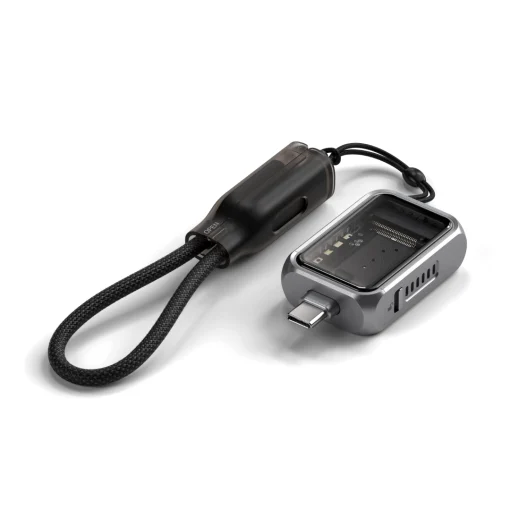
A portable NVMe SSD is an external solid-state drive that uses the NVMe (Non-Volatile Memory Express) protocol over a fast interface like USB 3.2, USB4, or Thunderbolt. Unlike older external HDDs or SATA-based SSDs, NVMe drives communicate directly over PCIe lanes, delivering dramatically higher speeds and lower latency.
In plain terms:
- Old external HDD: ~100–160 MB/s
- SATA external SSD: ~500–550 MB/s
- NVMe portable SSD (USB 3.2 Gen 2×2): ~1,800–2,000 MB/s
- NVMe portable SSD (USB4/Thunderbolt): ~3,000–6,000+ MB/s depending on host and drivedognotebook+3
That speed difference changes how you work: faster file transfers, smoother timeline scrubbing in video editors, quicker game loads, and less time staring at progress bars.
Why NVMe Over HDD or SATA SSD?

Speed & Responsiveness
Modern NVMe SSDs dominate in both sequential and random performance. In 2026 benchmarks:
- A top PCIe 5.0 NVMe SSD can hit 12–14 GB/s sequential read/write.
- A 7200 RPM HDD tops out around 250–300 MB/s.
- Random 4K IOPS on NVMe are in the millions, versus tens of thousands on HDDs.brieflyn
For creators, that means:
- Editing 4K/8K footage directly from the drive without proxy files.
- Loading large Photoshop, Blender, or Unreal projects in seconds.
- Transferring hundreds of gigabytes between machines in minutes, not hours.
Size, Power, and Durability
NVMe drives are tiny (M.2 2280, 2230, etc.), draw little power, and have no moving parts. Compared to HDDs, they’re:
- More shock-resistant (great for travel).
- More power-efficient (less battery drain on laptops).
- Often cooler and quieter under load.
Many portable NVMe SSDs now carry IP65/IP66 ratings for dust and water resistance, making them ideal for field work.dognotebook+1
Two Paths: Prebuilt Portable NVMe SSDs vs DIY Enclosures
You basically have two options:
- Buy a prebuilt portable NVMe SSD (e.g., Samsung T9, SanDisk Extreme Pro).
- Build your own by pairing an M.2 NVMe SSD with a USB4/Thunderbolt enclosure.
Each has pros and cons.
Prebuilt Portable NVMe SSDs
Pros:
- Plug-and-play simplicity: No assembly, no compatibility worries.
- Optimized firmware & thermals: Manufacturers tune performance and cooling for the specific drive.
- Rugged designs: Many have rubberized cases, drop resistance, and IP ratings.
- Warranty clarity: One product, one warranty.
Cons:
- Less flexibility: You’re locked into the included drive capacity and model.
- Often pricier per TB: You pay a premium for the integrated design and branding.
- Harder to upgrade: When you need more space, you usually buy a whole new drive.
Standout models in 2026:
- Samsung T7 Shield – Best all-around: USB 3.2 speeds (~1,000 MB/s), IP65 rating, proven reliability.dognotebook+1
- SanDisk Extreme Portable SSD / Extreme Pro – Excellent value and performance; IP65 ruggedness; great for travel and video work.dognotebook+1
- Samsung T9 – Premium pick with up to ~2,000 MB/s speeds and advanced thermal management.dognotebook
- OWC 4TB Express 1M2 (80Gb/s edition) – Among the fastest USB4-class portable SSDs, hitting ~6,000 MB/s on Thunderbolt 5 hosts.zamd
These are ideal if you want something reliable, compact, and ready to use today.
DIY NVMe Enclosures: Build Your Own Beast
If you like tinkering, want maximum performance, or just want better value per TB, NVMe enclosures are the way to go.
How it works:
You buy:
- An M.2 NVMe SSD (Gen4 or Gen5, depending on your needs and budget).
- A USB4/Thunderbolt NVMe enclosure.
- Assemble them (often tool-free) and you have a custom portable SSD.
Pros:
- Maximum flexibility: Choose any capacity, brand, or tier of NVMe drive.
- Better price per TB: High-capacity internal NVMe drives are often cheaper than prebuilt externals.
- Future-proofing: When NVMe prices drop or new generations arrive, you can swap the drive, not the whole unit.
- Tailored performance: Pair a top-tier Gen5 SSD with a high-end USB4/Thunderbolt enclosure for near-internal speeds.
Cons:
- Slightly more complex: You need to check compatibility (M.2 length, interface, cooling).
- Thermal management is on you: Poorly cooled enclosures can throttle performance.
- Warranty split: Drive and enclosure may have separate warranties.
Top NVMe Enclosures in 2026
Enclosures vary by interface (USB 3.2, USB4, Thunderbolt), cooling (passive vs active), and build quality. Here are the current leaders.
Best Overall: Sabrent EC-SNVE
- Interface: USB 3.2 Gen 2×2 (up to 20 Gbps).
- Why it wins: Excellent balance of price, compatibility, and real-world performance.
- Best for: Most users who want a fast, reliable external NVMe without paying USB4/Thunderbolt premiums.requiemforadream+2
Best High-Speed: Sabrent USB4 EC-U4TN
- Interface: USB4 / Thunderbolt (40 Gbps).
- Speeds: Around 3,900 MB/s sequential read/write on compatible hosts.requiemforadream+4
- Cooling: Active cooling (fan) to sustain high speeds under load.
- Best for: Video editors, 3D artists, and power users with USB4/Thunderbolt laptops who want near-internal NVMe performance in an external drive.requiemforadream+2
Best Budget-Friendly: Sabrent EC-PNVO
- Interface: USB 3.2 Gen 2 (10 Gbps).
- Speeds: Up to ~1,000 MB/s depending on the SSD.
- Best for: General users, students, and anyone who wants NVMe speeds without breaking the bank.requiemforadream
Best for Mac & Thunderbolt Users: StarTech USB4 M.2 NVMe Enclosure
- Interface: USB4 + Thunderbolt host support.
- Features: Well-documented controller, passive cooling, thermal pad, supports multiple M.2 lengths, excludes M.2 SATA (clean spec sheet).thunderboltlaptop
- Best for: Mac users and professionals who want a clean, reliable Thunderbolt/USB4 enclosure with good thermal design.thunderboltlaptop
Choosing the Right NVMe SSD for Your Enclosure
Not all NVMe drives are equal. Your choice should match your budget, performance needs, and thermal constraints.
Key Factors
- Generation: Gen4 vs Gen5
- Gen4 NVMe: Up to ~7,000–7,500 MB/s internally; more than enough for most external use, especially over USB4.
- Gen5 NVMe: Up to 12–14 GB/s internally; overkill for many, but future-proof for Thunderbolt 5/USB4 80Gbps setups.dongknows+2
- Form Factor
- 2280 (80 mm) – Most common, best cooling surface.
- 2230/2242 – Smaller, used in some laptops/handhelds; may run hotter in enclosures.newegg
- DRAM Cache vs DRAM-less
- DRAM-cached drives: Better sustained performance, ideal for heavy workloads (video editing, large datasets).
- DRAM-less drives: Cheaper, fine for general use, gaming, and light creative work.
- Thermals
- High-end Gen4/Gen5 drives can get hot. In compact enclosures, they may throttle.
- Look for drives with good efficiency and pair them with enclosures that have heatsinks, thermal pads, or active cooling.wu-ftpd+2
Recommended NVMe SSDs for Enclosures
- WD_BLACK SN850X – Top-tier Gen4 performance, great for high-speed enclosures.dongknows+1
- Crucial T500 / T705 – Excellent all-rounders for creators; strong performance and reliability.dongknows+1
- Samsung 990 Pro / 990 EVO Plus – Premium Gen4/Gen5 options with strong firmware and thermal behavior.dongknows+2
- Biwin Black Opal NV7400 – Budget-friendly Gen4 drive with impressive specs for the price.itechguides
- Patriot VP4000 Mini (2230) – Great for compact enclosures and handhelds.newegg
Real-World Use Cases: Who Benefits Most?
Video Editors & Filmmakers
- Edit 4K/8K timelines directly from the drive.
- Move project folders between edit suites in minutes.
- Use USB4/Thunderbolt enclosures with Gen4/Gen5 NVMe for near-internal performance.zamd+1
Photographers & Designers
- Store and browse massive Lightroom catalogs and PSD files without lag.
- Carry multiple terabytes of raw files in a pocket-sized drive.
- Benefit from rugged, drop-resistant designs for on-location shoots.dognotebook+1
Gamers
- Load modern AAA games in seconds instead of tens of seconds.
- Use portable NVMe SSDs with consoles and laptops that support external game storage.
- Build a “game library on the go” with multiple high-capacity drives.
Developers & Data Workers
- Run VMs, containers, and large datasets from fast external storage.
- Speed up builds, compiles, and database operations.
- Keep work environments portable between machines.
Students & Hybrid Workers
- Carry OS images, projects, and media libraries in a single small drive.
- Plug into any modern laptop and instantly have a high-speed workspace.
- Take advantage of affordable Gen4 NVMe + USB 3.2 enclosures for budget-friendly setups.newegg+1
Performance Reality Check: What Speeds Can You Expect?
Your actual speeds depend on three things: the SSD, the enclosure, and your host port.
Approximate real-world ceilings in 2026:
- USB 3.2 Gen 2 (10 Gbps): ~900–1,050 MB/s
- USB 3.2 Gen 2×2 (20 Gbps): ~1,800–2,000 MB/s
- USB4 / Thunderbolt 3/4 (40 Gbps): ~3,000–3,900 MB/s with good enclosures and SSDs.zamd+3
- Thunderbolt 5 / USB4 80Gbps: Up to ~6,000+ MB/s with cutting-edge portable SSDs like OWC’s 80Gb/s edition.zamd
Note: Many laptops still have 20 Gbps USB-C or 10 Gbps USB-A/C ports. Check your specs before buying a 40Gbps enclosure—you won’t see full speed on a slower port.
Thermal Management: The Hidden Bottleneck
NVMe drives can throttle when they overheat, especially in small metal enclosures.
Good practices:
- Choose enclosures with heatsinks, thermal pads, or active cooling for high-performance drives.wu-ftpd+2
- Avoid stuffing a top-tier Gen5 drive into a tiny, passively cooled budget case if you plan long sustained writes.
- For heavy workloads (long video exports, large backups), prefer enclosures designed for continuous throughput, not just peak bursts.
Sabrent’s USB4 EC-U4TN, for example, uses active cooling to maintain ~3,900 MB/s under load—ideal for pro video pipelines.ovrclock+1
Price & Value: Where the Sweet Spot Lies
As of mid‑2026:
- 4 TB PCIe 5.0 NVMe SSDs average around $240.
- High-capacity HDDs (e.g., 36 TB) still win on cost per TB, but lose badly on speed and latency.brieflyn
For portable use:
- Prebuilt 1–2 TB NVMe SSDs (Samsung T7/T9, SanDisk Extreme) often sit in the $130–$250 range depending on sales.newegg+2
- DIY setups (mid-range Gen4 NVMe + quality USB 3.2/USB4 enclosure) can be cheaper per TB and more upgradeable.
If you need ruggedness and simplicity, prebuilt is worth the premium. If you want maximum capacity and flexibility, DIY wins.
Step-by-Step: Building Your Own Portable NVMe SSD
- Pick your NVMe SSD
- Example: 2 TB WD_BLACK SN850X or Crucial T500 for strong Gen4 performance.dongknows+1
- Choose an enclosure
- USB 3.2 Gen 2×2: Sabrent EC-SNVE for most users.
- USB4/Thunderbolt: Sabrent EC-U4TN or StarTech USB4 enclosure for max speed.requiemforadream+3
- Check compatibility
- Ensure the enclosure supports your SSD’s M.2 length (2280, 2230, etc.).
- Confirm it’s NVMe-only or supports both NVMe and SATA as per your drive.thunderboltlaptop
- Assemble
- Many enclosures are tool-free: open, insert SSD at an angle, secure with the provided screw/clip, close.
- Apply any included thermal pad between SSD and enclosure.
- Format & use
- Format to APFS (Mac), NTFS/exFAT (Windows/cross-platform), or your preferred filesystem.
- Start moving projects, games, or entire workflows onto your new drive.
Common Mistakes to Avoid
- Buying a 40Gbps enclosure for a 10Gbps laptop – You’ll pay for speed you can’t use.
- Ignoring thermals – Pairing a hot Gen5 drive with a tiny, uncooled case leads to throttling.
- Overpaying for brand-name prebuilts when a DIY setup could give you 2–4× the capacity for the same money.
- Assuming all USB-C ports are equal – Check whether your port is 10 Gbps, 20 Gbps, 40 Gbps, or Thunderbolt.
The Bottom Line
Portable NVMe SSDs and enclosures in 2026 are no longer “nice to have”; they’re essential tools for anyone serious about speed, mobility, and productivity.
- If you want simplicity and ruggedness, grab a Samsung T7 Shield, SanDisk Extreme, or Samsung T9.
- If you want maximum performance and flexibility, pair a Gen4/Gen5 NVMe SSD with a Sabrent USB4 EC-U4TN or similar high-end enclosure.
- For budget-conscious users, a Gen4 NVMe + USB 3.2 enclosure delivers a massive upgrade over HDDs and SATA SSDs without breaking the bank.
In a world where time is the scarcest resource, a fast, reliable portable NVMe setup is one of the best investments you can make for your digital life.